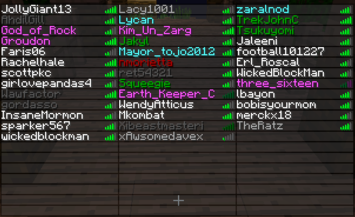
ColoredTablist
Very Simple Plugin to color your Playerlist!
Support my Work and visit my Homepage!
French translation 
ColoredTablist for Sponge
FAQ Click me before you ask something!
How it works:
- Install Vault
- Install the Plugin. (Drop the coloredtablist.jar file into your /plugins folder)
- Choose a Permissions Node named by the color.
Example: 'coloredtablist.blue' stands for blue :)
OR set 'UserPermissions' to false in the config and choose a color-code !scroll down! - Give a User (or a Group) the specifc Permissions Node.
OR give a Group the specific Color Code in the Config
Now when the User joins he automatically gets colored in the Playerlist (press Tab).
Commands:
You can use /ctl instead of /coloredtablist
- /coloredtablist help = Shows a help Page with available Commands.
- /coloredtablist reload = Reloads Config and Playerlist
- /coloredtablist colors = View List of Color-Codes.
- /coloredtablist nick <nickname> = Changes your Name in the Tablist until you reconnect or the Server reloads.
Config Commands:
- /coloredtablist set usepermissions <true/false>
- /coloredtablist set usechatnames <true/false>
- /coloredtablist set prefix<1> <colors>
- /coloredtablist set groups <group> <prefix/suffix> <value>
Configuration:
Version: 2.1.0
#Whether or not Permissions should be used instead of Groups:
UsePermissions: true

#Whether or not Displaynames should be used
UseChatNames: false

#If it should update a player name every 15 seconds
UpdateEvery15Seconds: true

#Write the Groups in, like here. Use "" as Prefix to dont have one. You can use Colors in Prefix using & so &4 would be red.
Groups:
    Member:
           prefix: '&e'
           suffix: '[M]'
    Admin:
           prefix: '&a'
           suffix: '[A]'
#Set text for coloredtablist.prefix1 here:
prefix1: '&b'
#Set text for coloredtablist.prefix2 here:
prefix2: exp
#Set text for coloredtablist.prefix3 here:
prefix3: mod
#Set text for coloredtablist.prefix4 here:
prefix4: admin
#Set text for coloredtablist.prefix5 here:
prefix5: boss
#Set text for coloredtablist.prefix6 here:
prefix6: idk
Permissions:
Color Codes:
Use them in Config with "&" instead of "#" and as Fullname in Permissions

| Symbol | Effect/Name |
|---|---|
| k | Magic/Random |
| l | Bold |
| m | |
| n | Underlined |
| o | Italic |
Videos:
English
German
French
Known Bugs:
- Max 14 Characters are shown in the Tablist, longer Names are shortened to 14 (Otherwise it would show an Error because 16 Characters is max. (and we are using Colors so its 16 -2 = 14 O.o)
Dont forget to Subscribe for File Updates!
Visit my Homepage!
This Plugin collects anonymous datas about your Server for mcstats.org
Comments


-

SendNoodlesYo Owner
-
View User Profile
-
Send Message
Posted Jul 23, 2012@mcheaven
Oh, Sorry, Didn't realize you meant the name of it, thought you meant the prefix. Thanks ;)
-
View User Profile
-
Send Message
Posted Jul 23, 2012@harryjamesuk
yes, what I said "."'s dont work ;) u have to change V.I.P to VIP
-
View User Profile
-
Send Message
Posted Jul 23, 2012@mcheaven
I used the Prefix as "" on another usergroup and that worked.
I'll pastebin my config to show you ;) : http://pastebin.com/VWsViwAC
-
View User Profile
-
Send Message
Posted Jul 23, 2012@harryjamesuk
it should work like that.. look at the default config above. But i'm not sure if using "." works..
-
View User Profile
-
Send Message
Posted Jul 23, 2012Oh, one last thing ;)
How would I make it turquoise and bold, I made it like this:
V.I.P: Colors: - 3 - l Prefix: ''
But it doesn't seem to work like that...
-
View User Profile
-
Send Message
Posted Jul 22, 2012@harryjamesuk
:) glad u like it.
-
View User Profile
-
Send Message
Posted Jul 22, 2012Just set it up now! Thanks for your help xD This is fantastic!!!!! I'm lovin' it!
-
View User Profile
-
Send Message
Posted Jul 21, 2012@zyxep
maybe you'll be able to configurate it some day.. :P
-
View User Profile
-
Send Message
Posted Jul 21, 2012@mcheaven
oh ya i see.
i thought i got it to work :S i removed the whole groups for bPermissions and started over, coloredtablist was the first i added, tested but when i added the inherence groups it fucked up :S i really don't know.
i really don't know why it show me the color for the previous group in the list.
So i decided to remove it for now.
-
View User Profile
-
Send Message
Posted Jul 21, 2012@zyxep
I'm using the bukkit color spelling, so it's not wrong :P but nice that u managed it to configurate the plugin ;)
-
View User Profile
-
Send Message
Posted Jul 21, 2012you have a wrong spelling.
you called it dark_gray but mojang call it dark grey :)
and btw, i think i got it to work.
-
View User Profile
-
Send Message
Posted Jul 21, 2012@harryjamesuk
no, use multi-permissions for that (look at the config)
-
View User Profile
-
Send Message
Posted Jul 21, 2012Can I have permissions like
coloredtablist.dark_red and colouredtablist.bold In the same usergroup?
-
View User Profile
-
Send Message
Posted Jul 21, 2012@zyxep
then u are doing something wrong, check if you are inheriting permissions and negate them in that case or use the group mode, also check out the faq
-
View User Profile
-
Send Message
Posted Jul 21, 2012@mcheaven
i still have a issue i removed old coloredtablist folder and jar, downloaded the newest 1.6.1
assigned 1 color to each of my groups. but i get the wrong color :S
-
View User Profile
-
Send Message
Posted Jul 21, 2012@zyxep
yes, a while ago
@tlgbtn
do you have vault installed?
-
View User Profile
-
Send Message
Posted Jul 20, 2012Hello,
Please help. http://i47.tinypic.com/335cbqx.png
-
View User Profile
-
Send Message
Posted Jul 20, 2012have you fixed so i can set color in my bPermissions groups? even when they inherent from other groups?
-
View User Profile
-
Send Message
Posted Jul 19, 2012@kyle0440
minecraft is already doing that, but you'd need different prefixes for every player so it won't rearrange the list..
-
View User Profile
-
Send Message
Posted Jul 19, 2012I have an idea, maybe make it send prefixes in a way where minecraft will arrange the names by the prefix, and not the moving characters?