ClickWarp
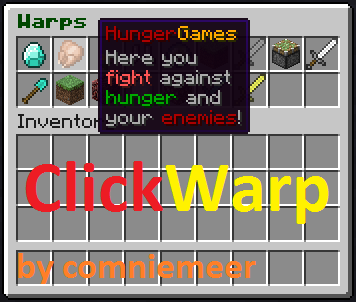
ClickWarp is a plugin that allows you to teleport to your warps via an inventory. It also allows you to teleport to a player via an inventory. Of course, you can use the classic warping-system via commands.
Update 03/18/2019:
Sorry for not posting anything on the progress recently. I know I promised to update the plugin in 2018, but I stopped the work after a progress of around 50%. I was rewriting the entire plugin, because my coding style from 2013 was absolutely bad.
I still feel there's potential for this plugin, but I don't know whether it would be downloaded and if there's still a target group. If you are interested, please feel free to participate in the following poll: https://www.strawpoll.me/17634201
Additionally, I now have a donation button, and I would be pleased if you could support my work with a little donation. It would help me motivate and finally update this plugin! Nearly 500.000 downloads can't lie!
Commands and Permissions
<Required> - [Optional]
| COMMAND | DESCRIPTION | PERMISSION | ALIASES |
|---|---|---|---|
| /warps | Shows you a list of available warps | clickwarp.warps | /warp |
| /warp <name> | Teleports you to the given warp | clickwarp.warp | /warps <name> |
| /invwarp | Opens an inventory with all warps, if you pick an item, you will be teleported there | clickwarp.invwarp | /invwarps |
| Invwarp-Item | Opens the /invwarp-inventory, the item is configurable in the config.yml | clickwarp.invwarp.item | |
| /setwarp <name> | Defines a new warp at the current location. Use color codes! ;) |
clickwarp.setwarp | |
| /setwarp <name> [item-ID] | Defines a new warp at the current location with the specified item that is shown in /invwarp | clickwarp.setwarp | |
| /setwarp <name> [item-ID] [price] | Defines a new warp at the current location with the specified item that is shown in /invwarp and the price that it costs | clickwarp.setwarp | |
| /delwarp <name> | Deletes a warp | clickwarp.delwarp | |
| /editwarp <name> item [item-ID] | Adds the warp an item which is displayed in /invwarp | clickwarp.editwarp | |
| /editwarp <name> lore [lore] | Adds the warp a lore which is displayed in /invwarp | clickwarp.editwarp | |
| /editwarp <name> price [price] | Adds the warp a price that it should cost | clickwarp.editwarp | |
| /invtp | Opens an inventory with all players online on the server, and if you pick one head, you will be teleported to this player | clickwarp.invtp | /invteleport |
| /clickwarp <version I reload> | Shows the version and reloads the files of the plugin | clickwarp.clickwarp |
Description for the /editwarp command
If you created a warp, you can do /editwarp to add additional meta to a warp.
/editwarp <warp> item <Item-ID> will change the item displayed in the /invwarp menu.
Example: /editwarp pvp item 276 will be shown as a diamond sword.
Another example: /editwarp shop item 35:14 will be shown as a red-wool block!
/editwarp <warp> lore <lore-text> will add a lore (description) to that warp in the /invwarp menu.
Example: /editwarp pvp lore &4Here_you_can:&2fight_against_your:&1enemies!
- The first line of the description is shown up red: "Here you can", while the second line is green: "fight against your" and the third blue: "enemies!".
The text will be splitted up in lines at any ":" and every "_" will be replaced by " ". Color codes are also possible.
Warp-specific permissions
You can now allow players access to all warps or only some specific warps via permissions!
First of all, give them the permission for the warp-method they are allowed to use:
- For warping via commands: clickwarp.warp
- For inventory-warping: clickwarp.invwarp
- For sign-warping: clickwarp.sign.use
Then give them the permission for:
- All warps: clickwarp.warp.*
or - Some specific warps: clickwarp.warp.<warp-name>
Sign-Warp
If you like to use your warps on signs, you can make now Warp-Signs!
Easily, put that on your sign:
| Line | Content | Description |
|---|---|---|
| Line 1 | [Warp] | You can edit the appearance after updating the sign in the config.yml |
| Line 2 | <warp-name> | Case insensitive, will be updated with colors and format automatically |
| Line 3 | Type what you want, e.g. a description |
|
| Line 4 | Type what you want, e.g. a description |
Permission for creating warp-signs: clickwarp.sign.create
Permission for using warp-signs: clickwarp.sign.use
Delays
If you like to warp or teleport players with a little delay, you can define in the config.yml these specific times.
You can set, whether delays are activated, how long players wait before teleporting and whether they shouldn't move.
If you like to let some groups/players bypass such delays, you can give them following permissions:
Give clickwarp.warp.instant to players that shouldn't be affected by warp-delays.
Give clickwarp.teleport.instant to players that shouldn't be affected by teleport-delays.
You can set in the config.yml whether delays should be used when warping via signs.
Current translations
If you're happy to support me, you can translate the language files to your language!
- English
- German
- French - thanks to Shlaten!
- Portugese - thanks to Ksocially!
- Czech - thanks to xSkillCycanxMC!
Known Bugs
- Item can't be "0" (AIR) -> StackTrace
TODO-List
- Sort items in the /invwarp menu however you want
- Custum commands
- Option to en- and disable warp-specific permissions
- Inv-TPA
- BungeeCord compatibility
- Convert/Migrate Essentials warps to ClickWarp warps
- Warp sounds
- If you have other ideas, write it in the comments or send me a pm!
Videos
MCStats

Comments

-

comniemeer Owner
-
View User Profile
-
Send Message
Posted Jul 16, 2013Can't wait for BungeeCord Compatibility
-
View User Profile
-
Send Message
Posted Jul 16, 2013@Blazex224
In the next version I will add a option, which allows you to change any command of the plugin to any command you like!
@zCreate
I will add a config-option to dis- and enable warp-specific permissions.
@colleboy2000
If you are a foreign speaker, could you send it me by PM? :D
@YoPro9
Yes, soon, when I have more time ;) (Because this will be a big update)
@SpikeyAussie56
I will add a sort-option.
@TheAppService
What is not working? For me and many other persons it works fine.
-
View User Profile
-
Send Message
Posted Jul 14, 2013The teleportation delay isn't working. Can you please fix that.
-
View User Profile
-
Send Message
Posted Jul 7, 2013wating for update I need the sort items out quick
-
View User Profile
-
Send Message
Posted Jul 7, 2013Awesome plugin! WIll it be updated?
-
View User Profile
-
Send Message
Posted Jul 7, 2013I made a Dutch language file! :)
-
View User Profile
-
Send Message
Posted Jun 26, 2013@comniemeer
sorry, lagg
-
View User Profile
-
Send Message
Posted Jun 23, 2013I think the plugin will be better if you add better permissions for warps like... clickwarp.warp.[warp-name] because the one you said to use doesn't work
-
View User Profile
-
Send Message
Posted Jun 23, 2013I think this plugin would be more useful to me, as well as many other people if the plugin could avoid just using the warp command for the items, and instead, you should be able to set ANY existing command to an item. This would be better because the warps will not override the essentials warps, and you already have all of your warps set.
-
View User Profile
-
Send Message
Posted Jun 23, 2013@shades161
I made a warp-plugin and not a spawn plugin, so I won't add it.
@mat41997
Hopefully in the next version.
And why you have to write that message twice?
-
View User Profile
-
Send Message
Posted Jun 23, 2013when next update?
-
View User Profile
-
Send Message
Posted Jun 23, 2013add tpa?
-
View User Profile
-
Send Message
Posted Jun 13, 2013i was thinking you could add a /setspawn command and when you do /warp spawn (or something similar) it makes an explosion noise or some sort of cool noise and only the person that warped to spawn can hear it.
-
View User Profile
-
Send Message
Posted Jun 13, 2013@TheMolkaPL
Thank you! Will be implemented in the next version!
@tjXJNOOBIE
Hmm... I don't know yet how to use the BungeeCord API etc., but I will think about it.
@Musikfreakmarcel
Es gibt da ein Plugin, das macht genau das was du willst: http://dev.bukkit.org/bukkit-mods/chest-commands/
@nicoxxl
I know of the bug with the "0", I'll fix it in the next version!
And that you can't move your items in the inventory is not fixable...
@XsaretPL
Hmm... I'll think of a possibility to add more aliases.
@MauriceFortuna
WIE OFT DENN NOCH!? http://dev.bukkit.org/bukkit-mods/clickwarp/#w-warp-specific-permissions
-
View User Profile
-
Send Message
Posted Jun 13, 2013HI,
Ich habe das Plugin auf meinem Server installiert , es funktioniert auch alles bei den Admins, nur die ``normalen User´´ können das Plugin nich nutzen. Wir benutzen den Groupmanager liegt es daran?
-
View User Profile
-
Send Message
Posted Jun 12, 2013I have a question , is there a way you can change the command from /warpinv to somthin' else I would love to make this command /taxi !
-
View User Profile
-
Send Message
Posted Jun 10, 2013Hi,
You're plugin is awesome, but you can chose item 0 (it cause a bug!).
In craftbukkit-beta (1.5.2-R0.1) You can't move items in your inventory.
But it's exactly what I need, very good work ;)
-
View User Profile
-
Send Message
Posted Jun 10, 2013Könntes du das so machen anstatt warps auch Commands. Z.B das öffnet sich und man klick drauf und ein Command wird ausgeführt z.b /killall Wäre gut wenn das geht.
-
View User Profile
-
Send Message
Posted Jun 9, 2013When people warp it clears their inventory
-
View User Profile
-
Send Message
Posted Jun 7, 2013Oh ja bitte könntest du das Plugin bungee cord kompatibel machen? :) Als click warp auf andere Server :)