
ChestShop (iConomyChestShop)
Acrobot released his first Android game, would you mind giving it a go?
ChestShop



A simple, yet very powerful system for making physical shops using signs and chests.
It's never been that easy to create shops! With features like shop protection and anti-lag protection, you won't have to worry about your server's economy anymore!
"Just works"! ChestShop supports almost all economy plugins by using Vault!
(Versions above 3.9.2 also support economy plugins using the Reserve API)
Some known compatible and incompatible economy plugins.
Please check if there are newer development builds before reporting issues!
If you are upgrading from a previous version of ChestShop please make sure to always read the warnings in the file's changelog!
The plugin by default submits anonymous stats about your server (player count, plugin/server version and type) to a public statistics websites (mcstats.org and bstats.org) in order to provide the developers with usage information. If you wish to opt out, you can do so in the PluginMetrics/config.yml and bstats/config.yml files. It also features an auto-update feature, which can be turned off in the config.
 Frequently Asked Questions
 Permissions
 User-made tutorials
 Download the latest stable version
 Download the latest development version
- Download 1.12.2 version
- Download 1.8.8 version
- Download older versions
 API for plugin developers
 Source code on GitHub
 Crowdin Localization Project
- Thread on Bukkit forums
- IRC chat (#chestshop on irc.esper.net)
- Discord Channel Joining through that invite auto subscribes you to important update notifications, if you don't want that use this invite.
![[IMG]](https://raw.githubusercontent.com/iconic/open-iconic/master/png/graph-2x.png) bStats metrics
bStats metrics
 Additional modules for ChestShop:
 ChestShop LegacyIds - allows usage of numeric and old pre 1.13 string IDs on signs
 Notification module - to use with Notifications plugin (outdated)
 Towny module - to use with Towny plugin
 ChestShop Notifier - records all sales, even when the player is offline (Maintained by Phoenix616)
- ChestShopTools - Enchantment info signs and empty shop notifier (Maintained by Phoenix616)
- Adda - Item display icons above the chest, transaction limit, Discord alerts, per-player shop limit! (User-made)
- ChestIcon - Icons for Chests, just like the Showcase plugin! (User-made, broken on newer versions)
- Libelula Auto Shop - easy creation of admin shops, using Essentials (User-made)
 ChestShopLimiter+ - limits the number of shops per player (User-made, abandoned)
 ChestShopListing - Stores shops and transactions in SQL; adds related features including in-game search (User-made)
![[IMG]](https://raw.githubusercontent.com/iconic/open-iconic/master/png/check-2x.png) ChestShopConfirmation - confirmation screen before buying (User-made)
ChestShopConfirmation - confirmation screen before buying (User-made) SearchChestShop - search for shops selling certain items (User-made)
 BoltChestShop - Add support for Bolt container protections (Made by the Bolt author)
Using shops
It's easy! Just right-click the sign to buy, left-click to sell. (You can configure the buttons in the config file!)
How to create a shop
Player shop
| Place a chest on the ground | |
| Place a sign 1 block away from the chest (for example, above it) | |
| On the sign, write: | 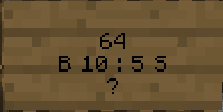 |
| Leave the first line empty. It will be automatically filled with your name by the plugin (if you have the permission ChestShop.admin then you can create shops with the names of other players) | |
| Second line is the amount of items to buy or sell | |
|
Third line is a combination of buy and sell prices. You need to have a price indicator (like 'B' - price that will apply to items BOUGHT by PLAYERS - or 'S' - the SELL price) near the price - the prices are separated by a colon (:) |
Some of the possible price combinations: "B 5:5 S", "B 5", "S free" |
|
The forth line will hold the id/name of the item. Write ? on the sign and the item will be autofilled with the one from the chest or you can click on the sign with the item afterwards. Optionally you can put the actual name on it. You can find out the name of the item you're holding by doing /iteminfo |
|
| Resulting Shop | 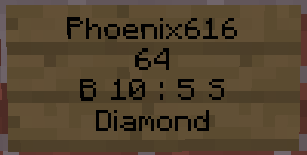 |
| A person can buy 64 diamonds for 10 dollars and sell them back for 5 dollars from Phoenix616 |
If you want you can also take a look at this video tutorial.
Admin Shop - shop with unlimited items
Firstly, you've got to be sure that you've the ChestShop.admin permission or that you are an OP. To make an Admin Shop, simply put "Admin Shop" (configurable in config.yml) on the first line of the sign when creating the shop. Admin Shops do not require a chest!
Translations
- /iteminfo - Get information about the item in your hand
- /iteminfo <id/name> - Get information about the item with the given id or name
- /shopinfo - Get information about the looked-at shop
- /csgive <itemcode> [<amount>] [<player>] - Give item with a unique ChestShop code to a player
- /cstoggle - Toggle buy and sell notificiation messages
- /chestshop version - Display the ChestShop version
- /chestshop reload - Reload the ChestShop config and translation messages. (This might not reload some features)
- /csaccess - Toggles ability to buy/sell on shops while having admin/access permissions and normally being ignored
Permission nodes
| Description | ||
|---|---|---|
| ChestShop.shop.* | shop creation and buying/selling - it contains: | |
| ChestShop.shop.create.* |
create all types of shops |
|
| ChestShop.shop.buy | buy any item from shop | |
| ChestShop.shop.sell | sell any item to shop | |
| ChestShop.mod | open any shop chest | |
| ChestShop.admin | open any shop chest, destroy stores, create (admin) shops |
A full list of permission nodes
Configurations
Useful tips by players
| How not to get bankrupt | A customisable price table |
| Alternative price table |
Compatibility
ChestShop directly hooks into the following plugins to provide additional functionality:
- AuthMe (and forks like AuthMe Reloaded)
- WorldGuard
- Residence
- LWC (and forks like LWCX and Modern-LWC)
- Lockette
- LockettePro
- Deadbolt
- SimpleChestLock
- OddItem
- Heroes
- ShowItem
Metrics
This resource sends metrics data to McStats and bStats. You can opt-out of metrics for all plugins on your server by changing the settings in the PluginMetrics/config.yml and the bStats/config.yml file if you don't want any data to be send.
More info
Even more information can be found in the old plugin thread on the forums.
Got an error or suggestion?
Simply submit a ticket here!
If you have a Github account and have coding knowledge you can also directly open an issue on Github. (You can also fund them via IssueHunt!)
If you just need general help feel free to ask in the comments or join the #chestshop channel on Spigot's IRC network (irc.spi.gt, webchat)
Has ChestShop helped you or your server?
If you want to thank the team in a more materialistic way, feel free to donate or buy Phoeni616 a beer! :)
%2526business%253dandrzejp%2540dysleksja.pl%2526bn%253dPP-DonationsBF%253abtn_donateCC_LG.gif%253aNonHosted%2526cancel_return%253dhttp%253a%252f%252fdev.bukkit.org%252fserver-mods%252fchestshop%252f%2526lc%253dUS%2526item_name%253dChestShop%2b(iConomyChestShop)%2b(from%2bBukkit.org)%2526cmd%253d_donations%2526rm%253d1%2526no_shipping%253d1%2526currency_code%253dUSD)
A shout-out to Acrobot's friend:
We believe that the music he makes is really stunning - you can decide it for yourself!
If you have an issue then please open a ticket on GitHub or post on SpigotMC.org for faster replies to questions!
Comments


-

Phoenix616 Owner
-

AcrobotPL Author
-

dmulloy2 Maintainer
-
View User Profile
-
Send Message
Posted Feb 27, 2013@tryy3
Tell us a bit more information. What item is being renamed for this to happen? all or just some?
-
View User Profile
-
Send Message
Posted Feb 27, 2013@asofold
I have nothing that conflicts with chesthop. The plugin works perfect when its working. Plugin List: http://bit.ly/K8zmut
-
View User Profile
-
Send Message
Posted Feb 27, 2013@Acrobot
To sell or buy I have to stand on the block left or right to the sign. if i say it like "look side ways towards the sign? I cant stand on the square in front of the sign. - but as i said this isnt an 24/7 thing - it happens randomly - a screenshot wont be much help cause the screenshot does not show any error. - nor does the console show any error when players cant buy/sell. I cant explain it anymore then I have sorry.
-
View User Profile
-
Send Message
Posted Feb 27, 2013@xsonarx
Are all those related to ChestShop?
Sometimes / always one can't interact with signs, depending on which items you have in the hand. This does not only apply to ChestShop signs but also to others (custom lift plugin, potentially others).
-
View User Profile
-
Send Message
Posted Feb 27, 2013@xsonarx Huh. Diagonal clicking? What exactly do you mean? Could you provide me with a screenshot?
@mrpickles71 No, it doesn't work if you're using the latest ChestShop version with the latest CraftBukkit.
@tubajedimaster Well, it doesn't say it anymore, but you should either:
- just delete plugins/ChestShop/local.yml file, and it'll auto-regenerate
- remove %amount from messages regarding buying/selling.
The cause is that ChestShop's core supports multi-item transactions now.
@tryy3 Nope. Not working on the latest ChestShop version with the latest CraftBukkit build.
@mafima Well, I'd say it's not ChestShop. Probably more of a problem with your economy plugin.
-
View User Profile
-
Send Message
Posted Feb 27, 2013i still have the error/bug that sometimes the whole server stopps from loading. every player stops moving... etc. then after 10-50 seconds my server recaps and works normally again. what can i do?
-
View User Profile
-
Send Message
Posted Feb 27, 2013@Acrobot
the anvil stuff, if you rename a item, then try to sell it, it will sell it, give you your money and give the item back, so it never takes te item away from you!
-
View User Profile
-
Send Message
Posted Feb 27, 2013@mrpickles71
try updating to v3.50 t0049
have fun banning the exploiters c:
-
View User Profile
-
Send Message
Posted Feb 26, 2013I have a problem here I don't know if it's in the source.
v 3.50 t0049
http://prntscr.com/ub9qd
-
View User Profile
-
Send Message
Posted Feb 26, 2013Huge Problem!
There is a glitch where if you sell to the admin shop with an item that you renamed, you dont lose the item but you gain the money.
For Example... The sign says - 1st Line= "Admin Shop" - 2nd Line= "1" - 3rd Line= "S 100" - 4th Line= "Wool"
If you sell a block of wool that you renamed (using the anvil), you gain the money but you dont lose the item. This means continual selling = unlimited money.
-
View User Profile
-
Send Message
Posted Feb 26, 2013@Acrobot
ofcourse. my server has never come across the diagonal clicking with essentials. only the last few days since adding chestshop it came out of hiding.
-
View User Profile
-
Send Message
Posted Feb 26, 2013@xsonarx Checked it again. Essentials uses exactly the same method for sign recognition like I do. Are you sure you are testing it while being right in front of the sign?
-
View User Profile
-
Send Message
Posted Feb 26, 2013@xsonarx I've got no idea, Essentials sign's shouldn't work either. I'll look into it, but it sounds weird.
@deltaspirit1 Have you tried checking the config?
-
View User Profile
-
Send Message
Posted Feb 26, 2013I have a problem with the new test versions, i´m using authme and when I use any of the test versions, if I log out when im floating or flying and then I come back, Theres a bug where everytime you open the chat to type your password, the chat will close and It wont let you log in.
-
View User Profile
-
Send Message
Posted Feb 26, 2013@Acrobot
I have no problem with the Essentials [buy] [sell] signs, I can buy/sell holding blocks without problems. but for some reason your plugin is drunk at times and if this was a minecraft bug why does one work fine and one doesn't? The only reason I tried chestshop was the fact buy/sell is on one sign :(. I guess for now ill stay with essentials shop signs.
-
View User Profile
-
Send Message
Posted Feb 26, 2013@tryy3 What dupe bug?
@jacklink01 No problem :)
-
View User Profile
-
Send Message
Posted Feb 26, 2013Hey i got v3.50 t0049 and my users can still use the dupe bug, please fix or tell me how to fix it! thanks!
-
View User Profile
-
Send Message
Posted Feb 25, 2013@Acrobot
Oh Sorry. We were using /itemdb from essentials. Thanks
-
View User Profile
-
Send Message
Posted Feb 25, 2013@Aortal It already supports it, exactly how you've written it :P
@dustyhacker Unfortunately, it's not possible. Vault (which I use) can only add/subtract money "generally", there is no way to take money from the specific world-account.
-
View User Profile
-
Send Message
Posted Feb 25, 2013Great plugin.
Would you consider adding the output chat to allow for color codes?
For example: You bought 1 Grass from Admin Shop for 5 &6Gold&f.