
Cannons
What can it do?
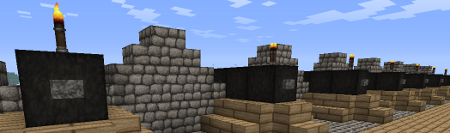
Cannons is a highly configurable plugin which allows you to fire block build cannons. It is possible to aim and load different amounts of gunpowder to hit targets at different ranges. The power of redstone makes it possible to set the gun to auto load and activate the rapid fire mode. Choose your projectile from a broad spectrum of cannonballs and smash the enemy.
With Cannons 2.0 you are also able to design your own cannons using .schematic files and give each cannon their own settings, as well as different types of projectiles.
Features
- Build a cannon out blocks
- Design your own cannon and save it as .schematic
- Design and fire different projectiles to smash your enemy
- Use redstone to fire guns from distance
- Rapid fire with auto-load possible
- Destroyed blocks can be restored with CreeperHeal (if 'custom' option is true)
- Cannons will stay load and aligned due to the database
- Movement plugins (e.g. Movecraft) are supported if a cannon has a sign to store a tag
- API for ships plugins (e.g. iSails) to use cannons on ships without signs.
Videos
by ServerMiner
by wickedbrother
Out-dated showcase 1
Out-dated showcase 2
Recommended plugins
- ObsidianDestroyer
- WorldGuard (flag protection: '/region flag NAME other-explosion deny')
- CreeperHeal (set 'custom explosion' for your world to repair cannon damage)
Installation
- Install WorldEdit first (don't forget this)
- Copy the cannons.jar into your Bukkit's "plugins" directory, then run the server.
Dependencies
This plugin requires:
Metrics
This plugin utilises Hidendra's plugin metrics system, which means that the following information is collected and sent to mcstats.org:
- A unique identifier
- The server's version of Java
- Whether the server is in offline or online mode
- The plugin's version
- The server's version
- The OS version/name and architecture
- The core count for the CPU
- The number of players online
- The Metrics version If you wish to disable this feature (/me cries), you can do so by opt-ing out, which you can do in the config file under /plugins/PluginMetrics/
Information for Cannons 2.x
Tutorial:
Additional information:
Cannon Designs
- Share your designs with other people: Cannon Designs
Known Bugs
- The cannon ball (snowball) becomes invisible after 60 blocks but hits the target.
- Voxelsniper will delete Buttons/Torches when you load the gun (be careful when you click the barrel)
Need Help?
Credits
- Raser4000
- DreTax
- JlJlJl
- and many more
%2526business%253dgruber_peter%2540gmx.at%2526bn%253dPP-DonationsBF%253abtn_donateCC_LG.gif%253aNonHosted%2526cancel_return%253dhttp%253a%252f%252fdev.bukkit.org%252fserver-mods%252fblock-cannons-v1-1%252f%2526lc%253dUS%2526item_name%253dCannons%2b(from%2bBukkit.org)%2526cmd%253d_donations%2526rm%253d1%2526no_shipping%253d1%2526currency_code%253dUSD)
Comments

-

DerPavlov Owner
-

_ForgeUser7183506 Tester
-
_ForgeUser8603593 Author
-

Robotnikrobotnik Documenter
-
View User Profile
-
Send Message
Posted Dec 31, 2013@DerPavlov
Made a ticket about my idea of homing cannonballs. They're not quite "homing" as you'd expect.
Homing Cannonball's logic from my ticket, in a nutshell:
And yes, it's meant to not be 100% accurate. See ticket for details and explanation.
-
View User Profile
-
Send Message
Posted Dec 30, 2013@CommodoreAlpha At the moment all explosion events are handled with bukkit, therefore it should be possible to block explosions. However all explosion will have entity null and can't be differentiated. I was looking for something like Shield a while ago. If the protection plugins still make problems I will have look into it.
Homing cannonball: Do you want to track an entity or a certain location. For a entity one can update the direction of the cannonball every tick. But it is only server side and the snowball movement might look choppy for the client.
For a certain location I would recommend a firing computer which calculates a firing solution for a perfect hit.
-
View User Profile
-
Send Message
Posted Dec 29, 2013Would it be possible to implement homing cannonballs? (I'm asking for "possible" - if you answer yes, I'll make a ticket expounding upon this idea in greater detail.)
Also, if you're ever concerned with this plugin and compatibility with protection plugins, you could consider using Shield, although it's a bit outdated because it's a one-man developer team maintaining a large plugin.
-
View User Profile
-
Send Message
Posted Dec 28, 2013You have to add the new projectile to the cannon design under allowed projectiles. This tells the plugin that this cannon can load this projectile. So you can create different cannons with different projectiles.
NOTE: I did really much in the last few days to improve Cannons. New features like Clusterbombs, a mortar design (finally), fireworks,... will be released tomorrow. However Cannons becomes larger and larger and I forget about features I programed months ago (did you know that you can autoreload from a chest if you shift+right click a cannon torch - of course you need the fitting permission). Therefore I want to make Cannons more user friendly.
I thought about features like listing all possible cannon designs and showing a cannon designs for a few seconds. If there is a community out there which relies on cannons and says this is a must have feature I will implement that. Please share your opinion with me, that is the best motivation. Also if you have more ideas about new features, you are welcome.
The next part will be about improving the performance for moving cannons. There will be commands to move/rotate a cannon, and also a API to plugins e.g. movecraft, ISail for a seamless implementation.
Pavlov
-
View User Profile
-
Send Message
Posted Dec 28, 2013Ok, I could be doing something wrong. The plugin works great and the default cannon works great. All the different configs for that cannon work fine. I cannot seam to create another projectile or cannon. I have read all the configs and still cannot appear to get more projectiles or cannons to be recognized. Any help would be appreciated. Thanks
-
View User Profile
-
Send Message
Posted Dec 25, 2013@MadAdaMada I don't know how the explosion event is handled in Towny. Cannons fires a explosion event with entity 'null' (the only way in bukkit to create explosions). You have to allow this kind of explosion to damage your town. Note that many other plugin might also use this kind of event.
-
View User Profile
-
Send Message
Posted Dec 23, 2013Hi there,
Does anyone know of a way to allow cannons to do damage to towns in Towny?
Thanks!
-
View User Profile
-
Send Message
Posted Dec 22, 2013@DerPavlov
Ok, much thanks. As a small suggestion, you might want to make this clearer on the sign/aim adjust messages.
-
View User Profile
-
Send Message
Posted Dec 21, 2013@DerPavlov
Oh, so the default angle is ADDED to the existing angle? When I had set a default angle but still read it ingame as 0 when I tried to angle the cannon, I figured that there was something wrong with it. ... I'm still getting problems with the angling system. I set both the default angle and the cannon's angle to 0 just to test it out, and it's still going at about the same height as it did when I had it set to 45.
Also, setting the torch value to 50:-1 didn't seem to work.
-
View User Profile
-
Send Message
Posted Dec 21, 2013@endlessnumber Default cannon angle is kind of an offset. So the cannon will fire with 15° even if the cannon angle displays 0°.
@der12panzer Basically you have to modify the .schematic file with worldedit. Two cannons have to be different, else the plugin can't differentiate both.
@NobleStrike Actually I didn't had time for performance testing, but if you are interested we can try some things.
@Typical_Name You want to replace the chest with a dispenser inventory? Can you send me a picture, so I can imagine that?
@Typical_Name The torch thing is hopefully easy to fix. In the config for the torch there is 50:5 which means: all torches with are placed on a block are firing triggers. However attaching it to a wall will change the datavalue. So try '50:-1' and it will work for all possible datavalues.
If you want to fire at a default vertical angle of e.g. 60° set the defaultVerticalAngle. So the 'real' angles would be in the range of 15°(60°-45°) to 105°(60°+45°)
That reminds me, that it is still not possible to rotate a cannon.
-
View User Profile
-
Send Message
Posted Dec 17, 2013Another issue with my flak cannon: I can't seem to get the cannon to fire at an angle of greater than 45 degrees. Setting the angle higher than 45 degrees actually seems to make the cannon fire lower.
Additionally, is there a way we can make the spread multiplier apply only to horizontal spread? I want my flak projectiles to be fairly inaccurate, but if I set their spread too high, they sometimes end up heading straight towards the ground.
EDIT: There appears to be another error; I cannot fire the cannon by right clicking the torch, even though I have set it in the config to do so. I can only fire the cannon with the button (if there is no button in the cannon design, I seem to be unable to fire it). This only happens with the cannons I've tried to design - the default still seems to work fine. I cannot think of a reason as to why this would be, since I have not changed the way the schematics are read in any of my designs. EDIT2: The issue with the torch was that apparently the torches only work if they're put on top of a block; torches placed against a block are apparently recorded with a different id and aren't recognized.
-
View User Profile
-
Send Message
Posted Dec 17, 2013@DerPavlov
I tried your suggestion, but the 3s timer was much too long. I need the secondary explosions to go off almost immediately after being released, so that they detonate in the air rather than landing on the ground and then detonating. (Also, the explosion power of tnt is probably a bit too much in this circumstance.)
-
View User Profile
-
Send Message
Posted Dec 16, 2013Hi I'm Oprichnik. I have a problem with Movecraft Plugin. I need to know how can I change the chest to a dispenser. Thank you.
-
View User Profile
-
Send Message
Posted Dec 16, 2013I don't mean to be rude but I had this plugin for a day and it brought me down to 7 tps when making the default cannon. On a 5 gig server. I will post to confirm this after 24 hours without this plugin. No I didn't have debug on. I couldn't afford it with players on at the time.
BUT the plugin is awesome
-
View User Profile
-
Send Message
Posted Dec 14, 2013There is a point in the cannon.yml file, where you can select the projectile you want. You have also to create the corresponding projectile file.
-
View User Profile
-
Send Message
Posted Dec 14, 2013I am currently running this plugin on my server. We can get the cannons to work fine but they will only fire cobblestone any ideas?
-
View User Profile
-
Send Message
Posted Dec 14, 2013There is already one in your plugin files.
Follow this link and all is explained.
http://dev.bukkit.org/bukkit-plugins/cannons/pages/installation-and-configuration/cannons-2-0-and-up/creating/
-
View User Profile
-
Send Message
Posted Dec 13, 2013can you load me a cannon. schematic ?
-
View User Profile
-
Send Message
Posted Dec 13, 2013When i creat a cannon and have the same yml. it doesent work why?
And what I m must copy from the cannon (new cannon)? only the cannon or all of them, the blocks and Torch and so on?
-
View User Profile
-
Send Message
Posted Dec 13, 2013First, I am happy to say that with 1.7.2 bukkit and the latest version of cannons, there are no more issues with Cannons and the Ships plugin :)
I have another problem though: I created a custom cannon with a specified minimum vertical angle of 15 degrees, and a default vertical angle of 15 degrees. However whenever I make this cannon in my world, it starts at 0 degrees (which is not desirable). Is there something I am doing wrong?
Lines of my design .yml file:
defaultVerticalAngle: 15.0
minVerticalAngle: 15.0